> ## Documentation Index
> Fetch the complete documentation index at: https://docs.weryai.com/llms.txt
> Use this file to discover all available pages before exploring further.
# Development Guide
> Best practices and advanced usage for WeryAI API
## Overview
This guide covers best practices, optimization techniques, and advanced features to help you get the most out of the WeryAI API.
## API Basics
### Base URL
```
https://api.weryai.com
```
### Request Format
All API requests should use:
* **Method**: POST for generation endpoints, GET for query endpoints
* **Content-Type**: `application/json`
* **Authorization**: `Bearer YOUR_API_KEY`
### Response Format
All responses follow a consistent structure:
```json theme={null}
{
"status": 0, // 0 = success, non-zero = error
"desc": "success", // Status description
"message": "success", // User-facing message
"data": {} // Response data
}
```
## Authentication
### Securing Your API Key
Never expose your API key in client-side code, public repositories, or logs.
**Best Practices:**
1. Store API keys in environment variables:
```bash theme={null}
export WERYAI_API_KEY="sk-xxxxxxxxxxxxxxxx"
```
2. Use a backend proxy to make API calls:
```javascript theme={null}
// Frontend calls your backend
fetch('/api/generate', { method: 'POST', body: data })
// Your backend calls WeryAI
// This keeps the API key secure on the server
```
3. Rotate keys regularly from the [API Keys page](https://weryai.com/api/keys)
4. If a key is compromised, immediately delete the old key and create a new one on the [API Keys page](https://weryai.com/api/keys)
## Webhook Integration
### Setting Up Webhooks
Webhooks allow you to receive results asynchronously without polling. Add the `webhook_url` parameter to your request:
```json theme={null}
{
"model": "FLUX_PRO",
"prompt": "A futuristic city at night",
"aspect_ratio": "16:9",
"webhook_url": "https://your-server.com/api/webhook"
}
```
### Webhook Response
When the task completes, WeryAI sends a POST request to your webhook URL:
```json theme={null}
{
"status": 0,
"desc": "success",
"message": "success",
"data": {
"task_id": "task_abc123",
"task_status": "SUCCESS",
"images": ["https://cdn.weryai.com/result/image1.png"]
}
}
```
### Handling Webhook Requests
Here's a simple example of webhook handling:
```javascript theme={null}
// Express.js example
app.post('/api/webhook', (req, res) => {
const { task_id, task_status, images } = req.body.data;
if (task_status === 'SUCCESS') {
// Process successful result
console.log('Generation completed, task ID:', task_id);
console.log('Generated images:', images);
// Update database, notify user, etc.
} else if (task_status === 'FAILED') {
// Handle failure
console.error('Generation failed:', req.body.data.msg);
}
res.status(200).send('OK');
});
```
## Optimizing Generation Quality
### Writing Better Prompts
Good prompts are specific, descriptive, and clear.
**Examples:**
❌ **Bad**: "a cat"
✅ **Good**: "A fluffy orange tabby cat sitting on a windowsill, soft natural lighting, photorealistic, high detail"
**Prompt Tips:**
1. **Be specific**: Include details about style, lighting, composition
2. **Use descriptive adjectives**: "vibrant", "dramatic", "soft", "detailed"
3. **Specify quality**: "high quality", "8k", "professional"
4. **Add style keywords**: "photorealistic", "anime style", "oil painting"
### Using Negative Prompts
Negative prompts help exclude unwanted elements:
```json theme={null}
{
"prompt": "A beautiful landscape with mountains and a lake",
"negative_prompt": "blurry, low quality, distorted, watermark, text, people"
}
```
### Aspect Ratio Selection
Choose the right aspect ratio for your use case:
* **1:1** - Profile pictures, thumbnails, social media posts
* **16:9** - Widescreen, YouTube thumbnails, presentations
* **9:16** - Vertical video, Instagram Stories, TikTok
* **4:3** - Traditional displays
* **21:9** - Ultra-wide, cinematic
## Error Handling
### Common Error Codes
| Status Code | Description | Solution |
| ----------- | ------------------------- | ------------------------------------------------------------------------ |
| 1001 | Parameter error | Check request parameter format and required fields |
| 1002 | Unauthorized | Verify your API key is correct |
| 1003 | Not found | Check if task ID or batch ID is valid |
| 1004 | Insufficient credits | Go to [Pricing page](https://weryai.com/api/pricing) to purchase credits |
| 1005 | Content moderation failed | Modify prompt to avoid sensitive content |
### Robust Error Handling
Implement comprehensive error handling:
```python theme={null}
import requests
def generate_with_error_handling(prompt):
try:
response = requests.post(
"https://api.weryai.com/v1/generation/text-to-image",
headers={"Authorization": f"Bearer {API_KEY}"},
json={
"model": "FLUX_PRO",
"prompt": prompt,
"aspect_ratio": "16:9"
},
timeout=30
)
response.raise_for_status()
result = response.json()
if result["status"] != 0:
print(f"API Error: {result['message']}")
return None
return result["data"]
except requests.exceptions.Timeout:
print("Request timed out, please retry later")
except requests.exceptions.RequestException as e:
print(f"Request failed: {e}")
except Exception as e:
print(f"Unexpected error: {e}")
return None
```
## Task Status Polling
### Polling Best Practices
When not using Webhooks, you need to poll for task status:
```python theme={null}
import time
import requests
def wait_for_completion(task_id, max_wait=300):
"""
Wait for task completion
Args:
task_id: Task ID
max_wait: Maximum wait time in seconds
"""
url = f"https://api.weryai.com/v1/generation/{task_id}/status"
headers = {"Authorization": f"Bearer {API_KEY}"}
start_time = time.time()
while time.time() - start_time < max_wait:
response = requests.get(url, headers=headers)
result = response.json()
if result["status"] != 0:
print(f"Query failed: {result['message']}")
return None
status = result["data"]["task_status"]
print(f"Task status: {status}")
if status == "SUCCESS":
return result["data"]
elif status == "FAILED":
print(f"Task failed: {result['data'].get('msg')}")
return None
# Wait 3-5 seconds before next query
time.sleep(3)
print("Wait timeout")
return None
```
We recommend a polling interval of 3-5 seconds. Too frequent polling wastes resources, while too long intervals affect user experience.
## Credit Management
### Monitor Credit Balance
Regularly check your account credit balance to avoid service interruptions:
* Visit the [Pricing page](https://weryai.com/api/pricing) to view real-time balance
* Pay attention to balance-related information in API responses
* Set up balance alerts and recharge in time when credits are low
### Optimize Credit Usage
Different models consume different amounts of credits. Choose the right model to optimize costs:
```python theme={null}
# Choose appropriate model based on needs
if need_high_quality:
model = "WERYAI_IMAGE_2_0" # 1 credit/image
elif need_fast_generation:
model = "QWEN_IMAGE" # 1 credit/image
else:
model = "GPT_IMAGE_MINI" # 1 credit/image
```
Check the [Pricing page](https://weryai.com/api/pricing) for detailed rates of each model.
## Monitoring and Debugging
### Using WeryAI Platform Features
WeryAI platform provides comprehensive monitoring and management features:
Create, view, copy, and delete API keys
View all API request records and details
View credit balance in real-time and purchase credits
Learn about credit consumption for different models
### Call History Features
On the [Call History page](https://weryai.com/api/history) you can:
* View complete records of all API requests
* Search for specific API calls by request ID
* View detailed information for each request (time, method, path, status code, duration)
* Analyze API call patterns and frequency
* Quickly locate and debug issues
### Local Logging
In addition to platform features, implement logging in your application:
```python theme={null}
import logging
logging.basicConfig(
level=logging.INFO,
format='%(asctime)s - %(name)s - %(levelname)s - %(message)s'
)
logger = logging.getLogger(__name__)
def generate_image_with_logging(prompt):
logger.info(f"Starting image generation, prompt: {prompt[:50]}...")
try:
response = make_api_request(prompt)
task_id = response["data"]["task_ids"][0]
logger.info(f"Task created successfully, ID: {task_id}")
result = wait_for_completion(task_id)
if result:
logger.info(f"Task completed: {task_id}")
else:
logger.error(f"Task failed: {task_id}")
return result
except Exception as e:
logger.error(f"Generation failed: {e}", exc_info=True)
raise
```
## Best Practices Summary
* Store API keys in environment variables
* Call API through backend proxy
* Rotate keys regularly
* Delete compromised keys immediately
* Implement comprehensive error handling
* Use Webhooks for async results
* Set reasonable polling intervals
* Keep detailed logs
* Monitor credit balance
* Choose appropriate models based on needs
* Check [Pricing page](https://weryai.com/api/pricing) for rates
* Enjoy discounts with bulk purchases
* Write detailed and specific prompts
* Use negative prompts to exclude unwanted elements
* Choose appropriate aspect ratios
* Learn from successful examples
## Platform Features Details
### API Key Management
Visit the [API Keys page](https://weryai.com/api/keys) to manage your keys:
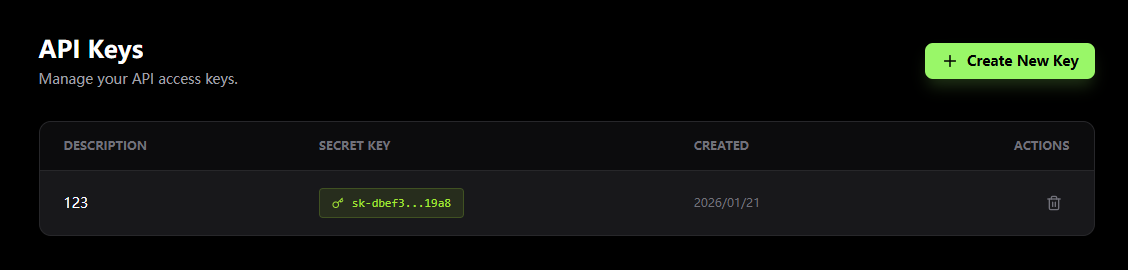 * **Create Keys**: Click "Create New Key" button to generate new API keys
* **View Keys**: See all created keys (keys are partially hidden for security)
* **Copy Keys**: Click copy button to quickly copy keys for development
* **Delete Keys**: Remove unused keys to improve security
We recommend creating different API keys for different projects or environments (development, testing, production) for better management and tracking.
### Credit Purchase Plans
Choose a suitable package on the [Pricing page](https://weryai.com/api/pricing):
| Amount | Credits | Unit Price |
| --------- | ------- | ------------- |
| \$50.00 | 1,000 | \$0.05/credit |
| \$200.00 | 4,000 | \$0.05/credit |
| \$500.00 | 12,500 | \$0.04/credit |
| \$1000.00 | 25,000 | \$0.04/credit |
| \$2000.00 | 50,000 | \$0.04/credit |
| \$3000.00 | 100,000 | \$0.03/credit |
| \$6000.00 | 200,000 | \$0.03/credit |
Larger packages offer better unit prices. Choose the right package based on your usage to save costs.
## Next Steps
Explore all available API endpoints and parameters
Create and manage your API keys
View and analyze API call records
Purchase credits and view model rates
* **Create Keys**: Click "Create New Key" button to generate new API keys
* **View Keys**: See all created keys (keys are partially hidden for security)
* **Copy Keys**: Click copy button to quickly copy keys for development
* **Delete Keys**: Remove unused keys to improve security
We recommend creating different API keys for different projects or environments (development, testing, production) for better management and tracking.
### Credit Purchase Plans
Choose a suitable package on the [Pricing page](https://weryai.com/api/pricing):
| Amount | Credits | Unit Price |
| --------- | ------- | ------------- |
| \$50.00 | 1,000 | \$0.05/credit |
| \$200.00 | 4,000 | \$0.05/credit |
| \$500.00 | 12,500 | \$0.04/credit |
| \$1000.00 | 25,000 | \$0.04/credit |
| \$2000.00 | 50,000 | \$0.04/credit |
| \$3000.00 | 100,000 | \$0.03/credit |
| \$6000.00 | 200,000 | \$0.03/credit |
Larger packages offer better unit prices. Choose the right package based on your usage to save costs.
## Next Steps
Explore all available API endpoints and parameters
Create and manage your API keys
View and analyze API call records
Purchase credits and view model rates