
Overview

This guide covers best practices, optimization techniques, and advanced features to help you get the most out of the WeryAI API.

API Basics

Base URL

https://api.weryai.com

Request Format

All API requests should use:
  • Method: POST for generation endpoints, GET for query endpoints
  • Content-Type: application/json
  • Authorization: Bearer YOUR_API_KEY

Response Format

All responses follow a consistent structure:
{
  "status": 0,           // 0 = success, non-zero = error
  "desc": "success",     // Status description
  "message": "success",  // User-facing message
  "data": {}            // Response data
}

Authentication

Securing Your API Key

Never expose your API key in client-side code, public repositories, or logs.
Best Practices:
  1. Store API keys in environment variables:
    export WERYAI_API_KEY="sk-xxxxxxxxxxxxxxxx"
    
  2. Use a backend proxy to make API calls:
    // Frontend calls your backend
    fetch('/api/generate', { method: 'POST', body: data })
    
    // Your backend calls WeryAI
    // This keeps the API key secure on the server
    
  3. Rotate keys regularly from the API Keys page
  4. If a key is compromised, immediately delete the old key and create a new one on the API Keys page

Webhook Integration

Setting Up Webhooks

Webhooks allow you to receive results asynchronously without polling. Add the webhook_url parameter to your request:
{
  "model": "FLUX_PRO",
  "prompt": "A futuristic city at night",
  "aspect_ratio": "16:9",
  "webhook_url": "https://your-server.com/api/webhook"
}

Webhook Response

When the task completes, WeryAI sends a POST request to your webhook URL:
{
  "status": 0,
  "desc": "success",
  "message": "success",
  "data": {
    "task_id": "task_abc123",
    "task_status": "SUCCESS",
    "images": ["https://cdn.weryai.com/result/image1.png"]
  }
}

Handling Webhook Requests

Here’s a simple example of webhook handling:
// Express.js example
app.post('/api/webhook', (req, res) => {
  const { task_id, task_status, images } = req.body.data;
  
  if (task_status === 'SUCCESS') {
    // Process successful result
    console.log('Generation completed, task ID:', task_id);
    console.log('Generated images:', images);
    // Update database, notify user, etc.
  } else if (task_status === 'FAILED') {
    // Handle failure
    console.error('Generation failed:', req.body.data.msg);
  }
  
  res.status(200).send('OK');
});

Optimizing Generation Quality

Writing Better Prompts

Good prompts are specific, descriptive, and clear.
Examples: Bad: “a cat” Good: “A fluffy orange tabby cat sitting on a windowsill, soft natural lighting, photorealistic, high detail” Prompt Tips:
  1. Be specific: Include details about style, lighting, composition
  2. Use descriptive adjectives: “vibrant”, “dramatic”, “soft”, “detailed”
  3. Specify quality: “high quality”, “8k”, “professional”
  4. Add style keywords: “photorealistic”, “anime style”, “oil painting”

Using Negative Prompts

Negative prompts help exclude unwanted elements:
{
  "prompt": "A beautiful landscape with mountains and a lake",
  "negative_prompt": "blurry, low quality, distorted, watermark, text, people"
}

Aspect Ratio Selection

Choose the right aspect ratio for your use case:
  • 1:1 - Profile pictures, thumbnails, social media posts
  • 16:9 - Widescreen, YouTube thumbnails, presentations
  • 9:16 - Vertical video, Instagram Stories, TikTok
  • 4:3 - Traditional displays
  • 21:9 - Ultra-wide, cinematic

Error Handling

Common Error Codes

Status CodeDescriptionSolution
1001Parameter errorCheck request parameter format and required fields
1002UnauthorizedVerify your API key is correct
1003Not foundCheck if task ID or batch ID is valid
1004Insufficient creditsGo to Pricing page to purchase credits
1005Content moderation failedModify prompt to avoid sensitive content

Robust Error Handling

Implement comprehensive error handling:
import requests

def generate_with_error_handling(prompt):
    try:
        response = requests.post(
            "https://api.weryai.com/v1/generation/text-to-image",
            headers={"Authorization": f"Bearer {API_KEY}"},
            json={
                "model": "FLUX_PRO",
                "prompt": prompt,
                "aspect_ratio": "16:9"
            },
            timeout=30
        )
        
        response.raise_for_status()
        result = response.json()
        
        if result["status"] != 0:
            print(f"API Error: {result['message']}")
            return None
            
        return result["data"]
        
    except requests.exceptions.Timeout:
        print("Request timed out, please retry later")
    except requests.exceptions.RequestException as e:
        print(f"Request failed: {e}")
    except Exception as e:
        print(f"Unexpected error: {e}")
    
    return None

Task Status Polling

Polling Best Practices

When not using Webhooks, you need to poll for task status:
import time
import requests

def wait_for_completion(task_id, max_wait=300):
    """
    Wait for task completion
    
    Args:
        task_id: Task ID
        max_wait: Maximum wait time in seconds
    """
    url = f"https://api.weryai.com/v1/generation/{task_id}/status"
    headers = {"Authorization": f"Bearer {API_KEY}"}
    
    start_time = time.time()
    
    while time.time() - start_time < max_wait:
        response = requests.get(url, headers=headers)
        result = response.json()
        
        if result["status"] != 0:
            print(f"Query failed: {result['message']}")
            return None
        
        status = result["data"]["task_status"]
        print(f"Task status: {status}")
        
        if status == "SUCCESS":
            return result["data"]
        elif status == "FAILED":
            print(f"Task failed: {result['data'].get('msg')}")
            return None
        
        # Wait 3-5 seconds before next query
        time.sleep(3)
    
    print("Wait timeout")
    return None
We recommend a polling interval of 3-5 seconds. Too frequent polling wastes resources, while too long intervals affect user experience.

Credit Management

Monitor Credit Balance

Regularly check your account credit balance to avoid service interruptions:
  • Visit the Pricing page to view real-time balance
  • Pay attention to balance-related information in API responses
  • Set up balance alerts and recharge in time when credits are low

Optimize Credit Usage

Different models consume different amounts of credits. Choose the right model to optimize costs:
# Choose appropriate model based on needs
if need_high_quality:
    model = "WERYAI_IMAGE_2_0"  # 1 credit/image
elif need_fast_generation:
    model = "QWEN_IMAGE"  # 1 credit/image
else:
    model = "GPT_IMAGE_MINI"  # 1 credit/image
Check the Pricing page for detailed rates of each model.

Monitoring and Debugging

Using WeryAI Platform Features

WeryAI platform provides comprehensive monitoring and management features:

API Key Management

Create, view, copy, and delete API keys

Call History

View all API request records and details

Credit Balance

View credit balance in real-time and purchase credits

Model Rates

Learn about credit consumption for different models

Call History Features

On the Call History page you can:
  • View complete records of all API requests
  • Search for specific API calls by request ID
  • View detailed information for each request (time, method, path, status code, duration)
  • Analyze API call patterns and frequency
  • Quickly locate and debug issues

Local Logging

In addition to platform features, implement logging in your application:
import logging

logging.basicConfig(
    level=logging.INFO,
    format='%(asctime)s - %(name)s - %(levelname)s - %(message)s'
)
logger = logging.getLogger(__name__)

def generate_image_with_logging(prompt):
    logger.info(f"Starting image generation, prompt: {prompt[:50]}...")
    
    try:
        response = make_api_request(prompt)
        task_id = response["data"]["task_ids"][0]
        logger.info(f"Task created successfully, ID: {task_id}")
        
        result = wait_for_completion(task_id)
        if result:
            logger.info(f"Task completed: {task_id}")
        else:
            logger.error(f"Task failed: {task_id}")
        
        return result
        
    except Exception as e:
        logger.error(f"Generation failed: {e}", exc_info=True)
        raise

Best Practices Summary

Security

  • Store API keys in environment variables
  • Call API through backend proxy
  • Rotate keys regularly
  • Delete compromised keys immediately

Reliability

  • Implement comprehensive error handling
  • Use Webhooks for async results
  • Set reasonable polling intervals
  • Keep detailed logs

Cost Optimization

  • Monitor credit balance
  • Choose appropriate models based on needs
  • Check Pricing page for rates
  • Enjoy discounts with bulk purchases

Quality Enhancement

  • Write detailed and specific prompts
  • Use negative prompts to exclude unwanted elements
  • Choose appropriate aspect ratios
  • Learn from successful examples

Platform Features Details

API Key Management

Visit the API Keys page to manage your keys: API Keys Management Interface
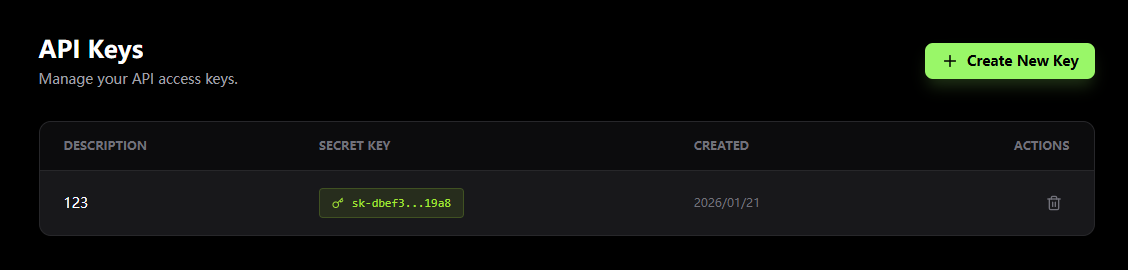
  • Create Keys: Click “Create New Key” button to generate new API keys
  • View Keys: See all created keys (keys are partially hidden for security)
  • Copy Keys: Click copy button to quickly copy keys for development
  • Delete Keys: Remove unused keys to improve security
We recommend creating different API keys for different projects or environments (development, testing, production) for better management and tracking.

Credit Purchase Plans

Choose a suitable package on the Pricing page:
AmountCreditsUnit Price
$50.001,000$0.05/credit
$200.004,000$0.05/credit
$500.0012,500$0.04/credit
$1000.0025,000$0.04/credit
$2000.0050,000$0.04/credit
$3000.00100,000$0.03/credit
$6000.00200,000$0.03/credit
Larger packages offer better unit prices. Choose the right package based on your usage to save costs.

Next Steps

API Reference

Explore all available API endpoints and parameters

API Keys

Create and manage your API keys

Call History

View and analyze API call records

Pricing

Purchase credits and view model rates